(a.k.a. “We live in the cloud…”)
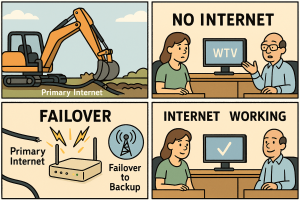
Picture this: it’s a normal Tuesday.
- Phones are ringing
- Orders are coming in
- Staff are in email, your ERP, booking jobs, taking payments
…and then the internet dies.
Suddenly:
- No email
- No cloud apps
- No card payments
- No “quick check” of anything
Everyone just sort of stares at their screens like they’re waiting for them to resurrect.
That’s the moment most small businesses discover they really needed redundant internet.
Let’s talk about what that actually means, why it matters, and how to set it up without selling a kidney.
What Does “Redundant Internet” Actually Mean?
“Redundant” sounds bad (“my boss says my job is redundant…”), but in IT it’s a good word.
Redundant internet means you have more than one way to get online:
- Your primary connection (say cable or fiber)
- A backup connection (second ISP, 5G/LTE, fixed wireless, Starlink, etc.)
If your main connection goes down, your network automatically fails over to the backup. Ideally, your staff barely notice – maybe a brief hiccup, then everything keeps working.
Think of it like this:
- One internet connection = driving without a spare tire
- Redundant internet = spare tire in the trunk and roadside assistance on speed dial
You can roll the dice with just one… until you’re stuck on the side of the road with a flat.
“We’re Just a Small Business – Do We Really Need That?”
Short answer: if you rely on anything in the cloud, you rely on your internet connection more than you think.
A few examples:
- Email: Microsoft 365, Google Workspace, hosted Exchange
- Phones: VoIP phone systems (RingCentral, 8×8, Zoom Phone, etc.)
- Finance & ERP: QuickBooks Online, Xero, Sage, SAP Business One, NetSuite
- CRM: Salesforce, HubSpot, Zoho, job management tools
- Collaboration: Teams, Zoom, Slack, Google Meet
- Line-of-business apps: Cloud-based inventory systems, booking systems, point-of-sale, patient records, ticketing…
If the internet is out, all of that is just… gone.
So ask yourself:
If our internet went down for 4 hours in the middle of the day, how much money – and how much sanity – would we lose?
For many small businesses, the answer is a lot.
Real-World “Ouch” Moments
Here’s what happens in the wild when a single internet connection fails:
- A retail store can’t run card payments, so they either lose sales or start writing down card numbers on sticky notes (please don’t).
- A trades company can’t access their cloud scheduling/dispatch system, so jobs get delayed and techs are stuck waiting for details.
- A professional services firm (accounting, legal, consulting) can’t reach client files in the cloud or send/receive email during their busiest week.
- A manufacturer can’t access their hosted SAP/ERP system, so production, shipping, and inventory all grind to a halt.
In each case, the business isn’t “down” because the server failed.
They’re down because one cable somewhere between them and the internet had a bad day.
Why Redundancy Beats “Hope for the Best”
Most small businesses rely on a single ISP and a lot of optimism.
That works… right up until:
- A construction crew cuts a line down the road
- Your ISP has a regional outage
- Someone misconfigures something in the provider’s network
- A storm or power issue knocks out local infrastructure
Then you’re offline, and here’s the key thing:
Your costs don’t stop just because your internet does.
Staff are still on the clock. Customers still need service. Deadlines don’t magically move.
Redundant connections turn a “we’re dead in the water” situation into a “small hiccup, keep going” situation.
What Redundant Internet Looks Like in Practice
You don’t need a giant enterprise setup. For most small businesses, redundancy looks like this:
1. Two Different Connections
Ideally from different providers and/or using different technologies:
- Cable + fiber
- Cable + DSL
- Cable/fiber + 5G/LTE
- Terrestrial ISP + satellite (e.g., Starlink)
If one ISP or physical line has issues, the other is still alive.
2. A Router/Firewall That Can Do Failover
Your network gear should:
- Connect to both internet lines
- Continuously check if the primary connection is healthy
- Automatically switch to the backup if the primary fails
Some setups can even do load balancing, using both connections at once for more bandwidth, then dropping to one if the other dies.
From your team’s point of view, they just keep working. Maybe a brief pause, then everything continues like nothing happened.
3. Smart Use of the Backup
A backup connection doesn’t have to be:
- As fast as your primary
- Used all the time
For example, you might use:
- A smaller/cheaper second line that only kicks in during outages
- A 5G/LTE link with a data cap that you only use for business-critical apps (email, ERP, phones) during failover
The goal is to keep essential operations online, not necessarily support 50 people streaming 4K YouTube during an outage.
“Isn’t That Expensive?”
Here’s the fun part: downtime is usually more expensive.
Let’s say:
- Backup connection = $100/month
- Outage during a busy day = 4 hours of lost productivity and sales
If your team of 10 averages $40/hour in loaded cost, that’s:
- 10 × $40 × 4 = $1,600 in staff cost alone, not counting lost revenue or angry customers.
Suddenly, $100/month to avoid that looks pretty reasonable.
Plus, you don’t always need a huge second pipe. A modest, business-grade backup line or 5G/LTE plan is often enough to keep you running when it matters.
How to Decide If You Need Redundant Internet (Spoiler: You Probably Do)
You almost definitely need redundancy if:
- Your phones are VoIP
- Your core business software lives in the cloud (ERP, CRM, scheduling, POS)
- You can’t operate normally without email or cloud access
- You have remote staff who connect into your systems daily
If losing internet for half a day would be more than a minor annoyance, redundancy should be on your must-have list, not your wish list.
Getting Started: A Simple Roadmap
- List your critical cloud services.
Email, ERP (SAP, NetSuite, Business One), accounting, POS, phones, file sharing, etc. - Estimate the cost of downtime.
Hours × staff cost × lost sales. Even a rough number is eye-opening. - Talk to your us about options.
- Second ISP
- 5G/LTE failover
- Starlink or fixed wireless for rural areas
- Appropriate router/firewall for automatic failover
- Decide what “must stay up” during an outage.
We can prioritize traffic so the important stuff (email, phones, ERP) keeps humming even if the backup link is slower. - Test the failover.
Flip the main line off during a quiet time and make sure everyone can still work. Better a “practice outage” than a surprise one.
The Bottom Line
In 2026, your internet connection is as critical as your power and your front door key.
One lonely ISP line is a single point of failure for your entire operation. Redundant internet turns that fragile setup into something resilient – so a cut cable, local outage, or provider hiccup doesn’t take your whole business offline.
You don’t need a fancy enterprise network. You just need:
- Two ways to reach the internet
- A smart box to switch between them
- A plan for what stays online if things go sideways
Think of it as a safety net for your cloud-powered world. Because when everything you rely on lives on the other side of that connection, having a backup isn’t a luxury – it’s just good business.
Leave a Reply